Guides
Keep Your Personal Calendar Private at Work
You want your work calendar to know you're busy during personal appointments, but you don't want colleagues seeing the details. The problem is that most calendar sharing options are all-or-nothing — either you share everything or nothing at all.
The Privacy Problem with Calendar Sharing
Google Calendar and Microsoft Outlook both allow you to share calendars, but their built-in sharing is designed for people on the same platform. If your personal calendar is on Google and your work calendar is on Outlook, sharing directly between them isn't straightforward.
Even when sharing is possible, the options are limited. You can often choose between sharing full details or just free/busy information, but you can't control this on a per-event basis. And if you subscribe to a calendar via URL, you get a read-only view that updates slowly and can't create blocking events.
How Don't Double Book Me Protects Your Privacy
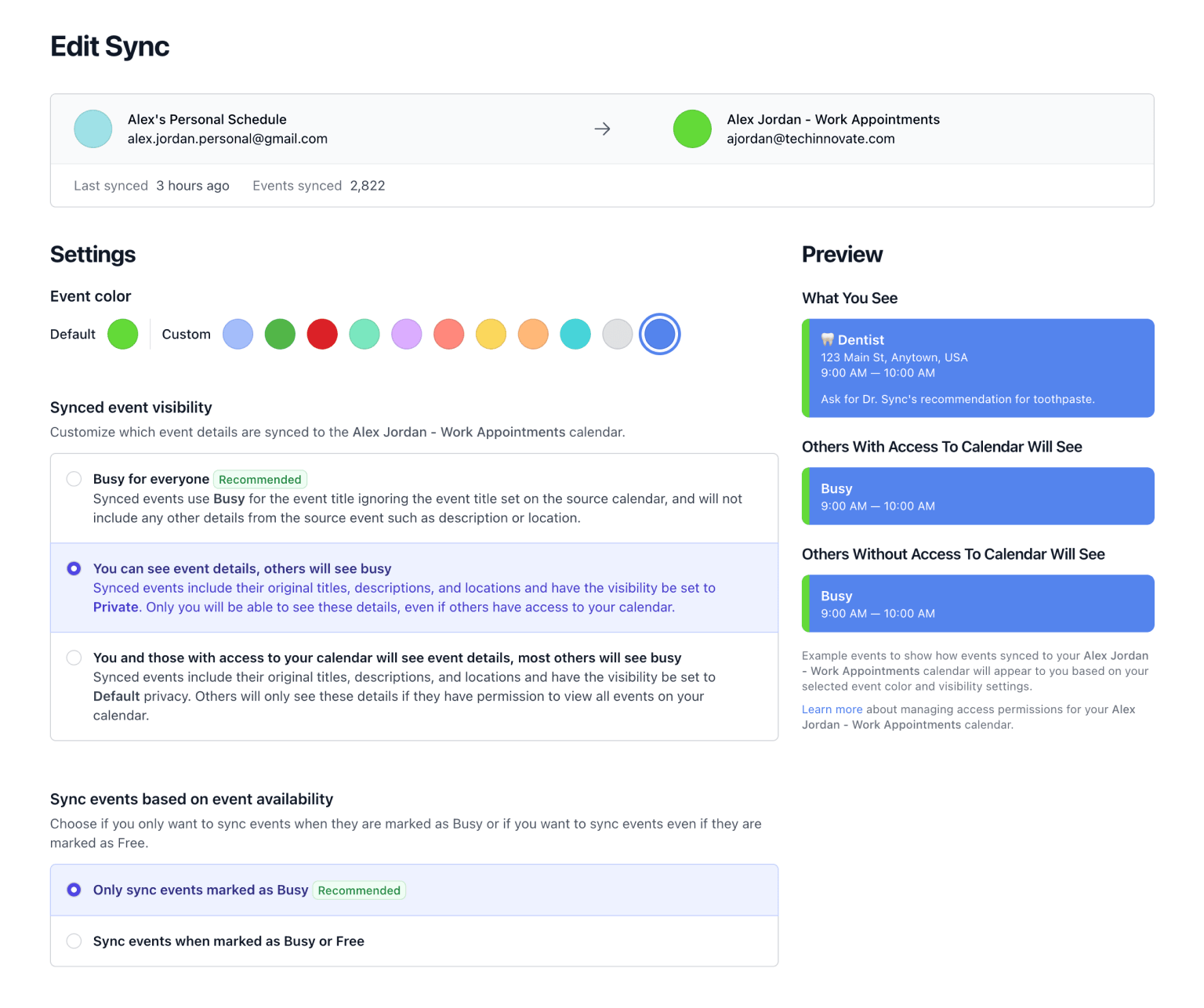
Don't Double Book Me syncs your calendars while giving you full control over what information crosses the boundary between personal and work. Here's how the privacy controls work:
- Show as Busy. The default option. Your work calendar shows a "Busy" block with no title, description, or attendees. Colleagues know you're unavailable but learn nothing about why.
- Mark as Private. The synced event appears on your work calendar with a "Private" flag. In most calendar clients, this means only you can see the details — everyone else sees "Private appointment."
- Keep Original Visibility. If you want the event details to carry over as-is, this option preserves the original title and visibility setting. Useful for events you don't mind sharing, like "Lunch."
Working Hours Keep Personal Time Personal
Privacy isn't only about hiding event details. It's also about boundaries. With working hours configuration, you can limit syncing to specific times of day. A Saturday yoga class won't appear as a "Busy" block on your Monday work calendar, because syncing only runs during the hours you define.
You can set different working hours for each day of the week. If you leave early on Fridays, Friday's working hours can end at 3 PM while other days end at 6 PM.
Security You Can Trust
Don't Double Book Me doesn't store your event data on its servers. OAuth tokens are encrypted with AES-GCM, and the service only accesses your calendars to read and write sync events. Your calendar data stays in Google and Microsoft — the app acts as a bridge, not a warehouse.
Get Started
Connect your Google and Outlook accounts, choose your privacy settings, and let Don't Double Book Me handle the rest. Your personal life stays private, and your work calendar stays accurate.
Start with a 1-week free trial (no credit card required), then just $20/year.
Related Resources
A better way to manage your Google, Microsoft Outlook, Apple, and Fastmail calendars.
Don't Double Book Me is designed for those who need to maintain a clear and coordinated schedule without the hassle of double bookings.