Comparisons
Comparing Outlook Calendar Sharing with Don't Double Book Me
Microsoft Outlook lets you share calendars and grant delegate access within your organization, but it only works inside the same Microsoft 365 tenant. If you have calendars across different organizations or use Google Calendar alongside Outlook, native sharing can't help. Don't Double Book Me creates real busy blocks across any combination of Google, Outlook, Apple, and Fastmail calendars, with full privacy controls.
Same Tenant Only
Outlook's calendar sharing works within your Microsoft 365 organization. You can share your calendar with coworkers in the same tenant, and they can see your availability or even your full event details. But if you have a personal Outlook account, a Google Calendar, or work with people in a different organization, native sharing doesn't reach across those boundaries.
Don't Double Book Me connects calendars across any combination of Google, Outlook, Apple, and Fastmail accounts: personal, work, different organizations, different providers. Your busy blocks flow between all of them automatically.
Visibility Without Blocking
Even within the same organization, Outlook's shared calendars show you someone's schedule as an overlay. The events don't actually block time on your own calendar. Your booking pages, scheduling tools, and coworkers can still book over those times because your calendar doesn't show a conflict.
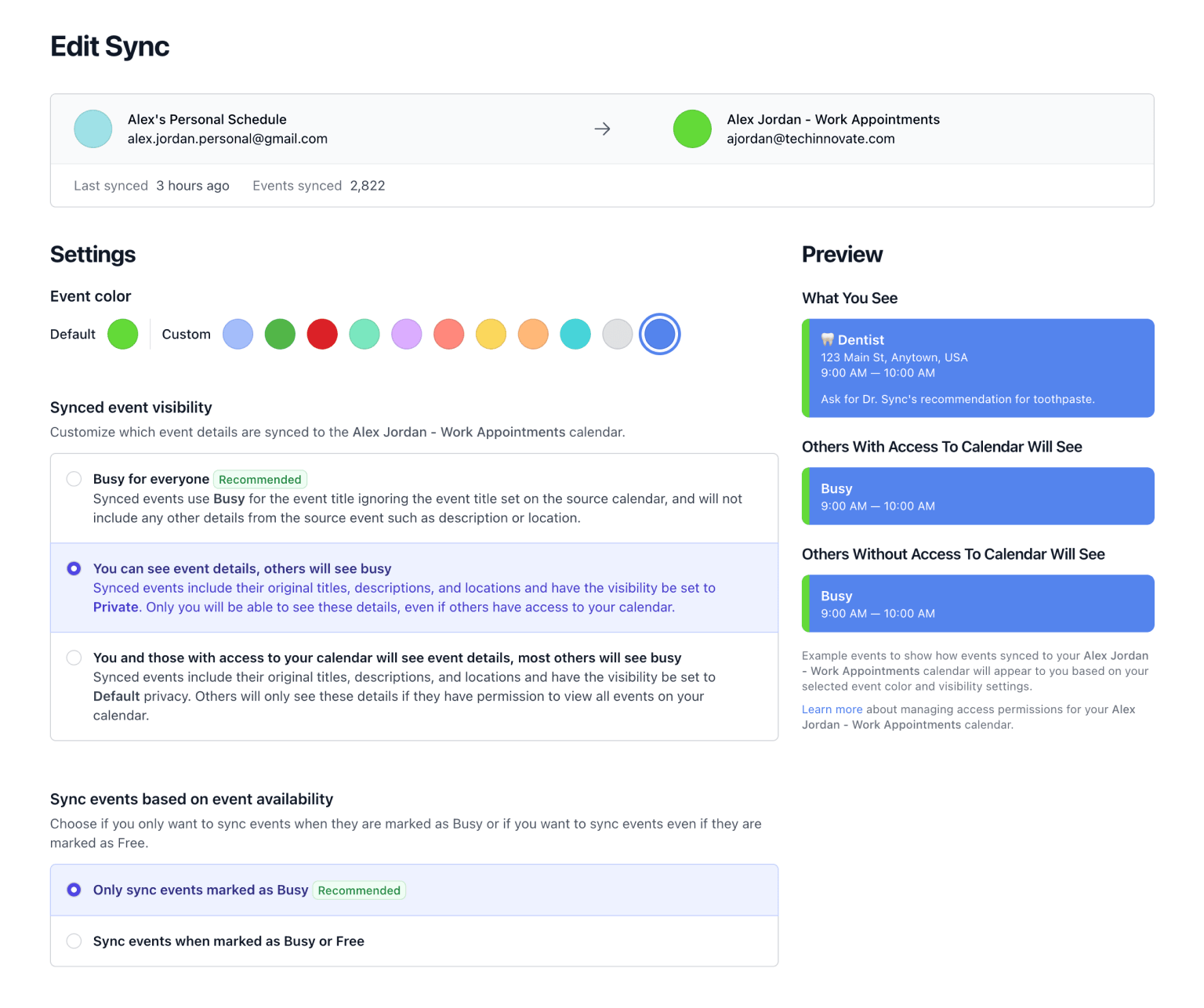
Don't Double Book Me creates actual events on your calendar. When your personal calendar has a dentist appointment, a corresponding busy block appears on your work calendar. Anyone checking your availability sees that time as taken.
Privacy Controls
Outlook's sharing permissions are all-or-nothing for each calendar: you either share free/busy only, limited details, or full details. You can't control visibility per-event or choose how synced events appear on the receiving calendar.
Don't Double Book Me lets you choose exactly how each sync's events appear: as "Busy" blocks with no details, as private events, or with the original information. You control what crosses between calendars, not your IT admin.
Simple Pricing
Personal Plan - $20/year
Outlook's calendar sharing is bundled with Microsoft 365, but it only works within your organization and doesn't create busy blocks. Don't Double Book Me costs just $20/year and actually prevents double bookings across Google, Outlook, Apple, and Fastmail with privacy controls.
Team Plan - $16/seat/year
For teams where everyone needs their calendars synced across multiple accounts and providers, our team plan provides unlimited syncs at $16/seat/year with consolidated billing and priority support.
-
Dentist
9:00 AM — 10:00 AM
-
Busy
9:00 AM — 10:00 AM
Feature comparison
Don't Double Book Me
Reserve time between your Google, Microsoft Outlook, Apple, and Fastmail calendars, ensuring your schedule is conflict-free without sharing your sensitive event details.
Pricing
- Personal plan
- $20/year ($1.66/month)
- Team plan
- $16/user/year ($1.33/month)
- Calendar syncs
- Unlimited
Calendars
-
Google
- Yes
-
Microsoft Outlook
- Yes
Features
- Creates Busy Blocks
- Yes
- Real-Time Sync
- Yes
- Privacy Controls
- Yes
- Cross-Platform
- Yes
- Working Hours
- Yes
- Rounded Event Times
- Yes
Support
- 24/7 online support
- Yes
- Priority support for all customers
- Yes
Outlook Calendar Sharing
Microsoft Outlook's built-in calendar sharing lets you share calendars and delegate access within the same Microsoft 365 organization.
Pricing
- Personal plan
- Free (included)
- Team plan
- Requires Microsoft 365
- Calendar syncs
- View only (no busy blocks)
Calendars
-
Google
- No
-
Microsoft Outlook
- Same organization only
Features
- Creates Busy Blocks
- No
- Real-Time Sync
- No
- Privacy Controls
- No
- Cross-Platform
- No
- Working Hours
- No
- Rounded Event Times
- No
Support
- 24/7 online support
- Yes
- Priority support for all customers
- No
Feature comparison
Pricing
| Pricing | Don't Double Book Me | Outlook Calendar Sharing |
|---|---|---|
| Personal plan | $20/year ($1.66/month) | Free (included) |
| Team plan | $16/user/year ($1.33/month) | Requires Microsoft 365 |
| Calendar syncs | Unlimited | View only (no busy blocks) |
Calendars
| Calendar | Don't Double Book Me | Outlook Calendar Sharing |
|---|---|---|
|
Google
|
Yes | No |
|
Microsoft Outlook
|
Yes | Same organization only |
Features
| Feature | Don't Double Book Me | Outlook Calendar Sharing |
|---|---|---|
| Creates Busy Blocks | Yes | No |
| Real-Time Sync | Yes | No |
| Privacy Controls | Yes | No |
| Cross-Platform | Yes | No |
| Working Hours | Yes | No |
| Rounded Event Times | Yes | No |
Support
| Support | Don't Double Book Me | Outlook Calendar Sharing |
|---|---|---|
| 24/7 online support | Yes | Yes |
| Priority support for all customers | Yes | No |
Related Resources
A better way to manage your Google, Microsoft Outlook, Apple, and Fastmail calendars.
Don't Double Book Me is designed for those who need to maintain a clear and coordinated schedule without the hassle of double bookings.